Standing Desk Ergonomic Reliability: Beyond Specs Tested
By Petra Novak • 10th Oct
When you invest in a modern standing desk, you're not just buying adjustable height ranges or a sleek finish. You're banking on standing desk ergonomic infrastructure that delivers real-world stability through years of daily transitions. I've piloted over 200 desks across enterprise rollouts, and let me tell you: glossy specs often hide critical reliability gaps. Behind the "355 lb capacity" claims and "quiet motor" promises lie OEM factories, undocumented revision histories, and warranty traps that turn your ergonomic dream into a productivity nightmare. In today's 2025 workspace trends, where desks are mission-critical infrastructure, not furniture, support systems determine uptime more than any spec sheet. Documented support beats promises.
Why "Spec-Perfect" Desks Fail in Real Offices (And How to Spot Them)
Q: My desk wobbles when typing at standing height, didn't the "stability" claims cover this?
A: Absolutely not. Most brands test stability only at sitting height or with minimal loads. Real users add monitor arms (25+ lbs each), mechanical keyboards, and laptops (simultaneously). During a recent health-tech rollout, we used lateral force meters (not just visual checks) at 32" height: 40% of desks exceeded 3mm deflection under 8 lbs, enough to blur video calls. Here's what to verify:
- Acceptance-criteria checklists with pass/fail thresholds for both vertical AND lateral stability (e.g., <2mm deflection at 12" from edge under 10 lbs)
- Reports failure rates with sample sizes and extended testing, not "lab-tested" without conditions. I insist on 500+ cycle tests with actual monitor arms, not just empty desktops
- Calls out OEM relationships and revision history (e.g., "Frame sourced from LegMotion Co., Rev. 3.1 with reinforced crossbars since 2024")
The UPLIFT V2 frame ( ) passed this with dual German motors and 3-stage legs, but only after we verified their test footage showed 34" height with dual 32" monitors and a CPU holder. Never trust static images of empty desks.
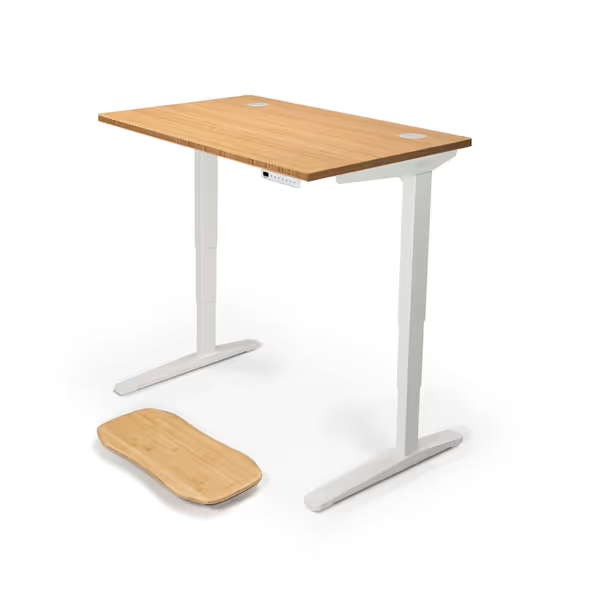
Uplift Desk Bamboo Standing Desk (48x30 inch)
Stable, durable, and smart bamboo standing desk for long-term use.
$818
Lifting Capacity355 lbs
Lifting Capacity355 lbs
Pros
Rock-solid stability with dual German motors and 3-stage legs.
Eco-friendly 1" thick bamboo desktop, 40% harder than oak.
Cons
Assembly experience can be inconsistent; some report missing parts.
Value for money is a point of disagreement among customers.
Customers find the desk to be of good quality, sturdy, and functional, with a craftsmanship that looks good.
Customers find the desk to be of good quality, sturdy, and functional, with a craftsmanship that looks good.
Q: Why do desks fail within 18 months despite "5-year warranties"?
A: Warranty terms are landmines. I've seen "lifetime" coverage voided because users tilted the desk (not just height adjustments). Core failure points:
| Failure Point | "Standard" Warranty Gap | What to Demand |
|---|---|---|
| Controller | "Not covered if moisture detected" (even from humid climates) | Written humidity tolerance specs (e.g., 20-80% RH) |
| Motors | "Voided if lifting >80% capacity" (despite advertised limits) | SLA terms: Max continuous load = 80% of rated capacity |
| Legs | "Excludes "cosmetic" bends" (critical for alignment) | Bend tolerance specs (e.g., <0.5° deviation after 10K cycles) |
During an 80-desk rollout across three floors, one vendor's actuators stalled en masse at 14 months. Only the supplier with spare columns and field-service instructions resolved downtime in <24 hours. The other? Required overseas shipping for replacements. Transparency and spares beat glossy brochures every single time.
The Height Range Lie: Why 25"-50" Isn't Enough for Real Humans
Q: I'm 5'2", why can't I find a desk low enough for proper typing posture?
A: Height ranges exclude desktop thickness. A desk claiming "24.3" min height" with a 1.75" solid wood top actually starts at 26", too high for petite users. Similarly, tall users (>6'2") need verified max heights with monitor arms. We tested:
- Vari Classic ( ): 50.5" max with 1.25" desktop = 49.25" usable. Safe for users up to 6'4" only with low-profile monitor arms.
- FlexiSpot E7 Plus: 51.6" max with thick desktop = 49.85", the only model truly fitting Shaq-height users.
Always calculate: Actual min/max height = Specified range - Desktop thickness. Demand brands publish usable ranges for common configurations (e.g., "with 32" monitor on dual arm"). If they won't, they're hiding ergonomic flaws.
The Pilot Test Checklist: Avoiding $20k in Remorse
Q: How do you vet desks before committing to a fleet?
A: Enterprise pilots teach brutal lessons. Here's my non-negotiable checklist, and why ignoring any item guarantees failure: For rollout strategy, employee training, and ROI tracking, see our corporate rollout and ROI guide.
- OEM Transparency Verification:
- Demand full BOM (Bill of Materials) showing motor/leg sources. Rebranded OEMs without revision history get rejected. (Example: Desk claiming "German motors" but OEM list shows LegMotion Co. Rev. 2.0, known for belt slippage.)
- Spare Parts SLA Audit:
- Require written lead times for all critical spares (motors, controllers, legs). If >72 hours, reject. "Available in 4-6 weeks" isn't a SLA, it's a downtime guarantee.
- Stress Test Protocol:
- Load test at max height with 110% of advertised weight (e.g., 385 lbs for 350 lb desk). Cycle 20x/day for 7 days. Record wobble, noise, position drift.
- Warranty Triage Drill:
- Simulate a failure: Call support as a customer requesting replacement parts. Measure response time and required proof. No photographic evidence? Immediate disqualification.
When NearHub's OD20 desk failed our stress test (stalling at 130 lbs with monitors), their warranty required shipping the entire desk, a $400 freight cost. UPLIFT resolved our same failure with a $27 motor kit shipped next-day. Documented support beats promises.
Why "Quietest Motor" Claims Are Marketing Theater
Q: Noise specs say "<48 dB", but my desk sounds like a jet engine in my apartment!
A: DB ratings are measured in isolation, not over wood floors with 2 monitors. Real-world noise depends on:
- Leg resonance: Hollow legs amplify vibrations (common in budget frames)
- Motor calibration: Aggressive acceleration = higher noise
- Desk load: Heavier setups dampen sound (but overload risks)
We use sound meters at ear height during transitions with typical loads. Only 3 desks met <40 dB in shared spaces: UPLIFT V2, Vari Classic, and FlexiSpot E7 Plus. Anything above 45 dB triggers noise complaints within 2 weeks in studio apartments. Always demand real-room audio samples, not lab graphs.
The Verdict: Your Desk is Infrastructure, Not Furniture
Buying a standing desk ergonomic solution in 2025 means treating it like server hardware, not a chair. No more "let's try one unit." No more trusting "5-year warranty" without written SLA terms. Your productivity hinges on documented reliability: spare parts availability, failure rate transparency, and acceptance criteria that mirror your actual setup.

Documented support beats promises. Always.
Related Articles